Multithreading
Java multithreading lets your program do multiple things at the same time — downloading a file while updating a progress bar, handling thousands of web requests simultaneously, or running heavy calculations without freezing your UI. Understanding threads is one of the most valuable skills a Java developer can have.
What Is a Thread?
A thread is the smallest unit of execution inside a process. Your Java application is itself a process, and by default it runs on a single thread — the main thread. When you create additional threads, you allow different parts of your code to run concurrently.
Think of a process as a restaurant kitchen. The kitchen (process) has one head chef (main thread) by default. Multithreading is hiring more chefs who can all work on different dishes at the same time, sharing the same kitchen equipment (memory and resources).
public class MainThreadDemo {
    public static void main(String[] args) {
        // The current thread is always accessible like this
        Thread current = Thread.currentThread();
        System.out.println("Thread name : " + current.getName());
        System.out.println("Thread priority: " + current.getPriority());
        System.out.println("Thread group  : " + current.getThreadGroup().getName());
    }
}
Output:
Thread name : main
Thread priority: 5
Thread group  : main
Concurrency vs Parallelism
These two terms come up constantly — they are related but different:
| Term | Meaning | Example |
|---|---|---|
| Concurrency | Multiple tasks make progress over the same time period (may take turns on one CPU core) | A single-core CPU switching rapidly between threads |
| Parallelism | Multiple tasks literally run at the same instant on different CPU cores | A quad-core CPU running 4 threads simultaneously |
Java threads give you concurrency by default. Whether you get true parallelism depends on the number of CPU cores available and how the OS scheduler assigns threads.
Creating a Thread
Java gives you two primary ways to create a thread: extend Thread or implement Runnable. A third modern option is Callable (which can return a result).
Extending Thread
class MyThread extends Thread {
    @Override
    public void run() {
        for (int i = 1; i <= 3; i++) {
            System.out.println(getName() + " — count: " + i);
        }
    }
}

public class ExtendThreadDemo {
    public static void main(String[] args) {
        MyThread t1 = new MyThread();
        MyThread t2 = new MyThread();
        t1.start(); // DO NOT call run() directly — use start()
        t2.start();
    }
}
Output (order may vary):
Thread-0 — count: 1
Thread-1 — count: 1
Thread-0 — count: 2
Thread-1 — count: 2
Thread-0 — count: 3
Thread-1 — count: 3
Implementing Runnable
This approach is preferred because Java only allows single inheritance — implementing Runnable keeps your class free to extend something else.
class PrintTask implements Runnable {
    private final String message;

    PrintTask(String message) {
        this.message = message;
    }

    @Override
    public void run() {
        System.out.println(Thread.currentThread().getName() + ": " + message);
    }
}

public class RunnableDemo {
    public static void main(String[] args) {
        Thread t1 = new Thread(new PrintTask("Hello from t1"));
        Thread t2 = new Thread(new PrintTask("Hello from t2"));
        t1.start();
        t2.start();
    }
}
Tip: With Java 8+ lambdas, you can create a
Runnableinline:new Thread(() -> System.out.println("Hi!")).start();— great for short tasks.
See Creating a Thread for a thorough walkthrough of all approaches including Callable.
The Thread Life Cycle
A thread moves through several states during its life:
NEW → RUNNABLE → (RUNNING) → BLOCKED / WAITING / TIMED_WAITING → TERMINATED- NEW — created with
new Thread(...), not started yet - RUNNABLE — after
start()is called; ready to run (may or may not be actively executing) - BLOCKED — waiting to acquire a monitor lock
- WAITING — waiting indefinitely (e.g., via
wait()orjoin()) - TIMED_WAITING — waiting for a specific duration (e.g., via
sleep(ms)) - TERMINATED —
run()has completed
public class ThreadStateDemo {
    public static void main(String[] args) throws InterruptedException {
        Thread t = new Thread(() -> {
            try { Thread.sleep(500); } catch (InterruptedException e) { Thread.currentThread().interrupt(); }
        });

        System.out.println("Before start : " + t.getState()); // NEW
        t.start();
        System.out.println("After  start : " + t.getState()); // RUNNABLE or TIMED_WAITING
        t.join();
        System.out.println("After  join  : " + t.getState()); // TERMINATED
    }
}
Output:
Before start : NEW
After  start : TIMED_WAITING
After  join  : TERMINATED
See Thread Life Cycle for a detailed state diagram and all transitions.
Why Synchronization Matters
When multiple threads share data, things can go wrong fast. This is called a race condition:
public class RaceConditionDemo {
    static int counter = 0;

    public static void main(String[] args) throws InterruptedException {
        Runnable task = () -> {
            for (int i = 0; i < 1000; i++) {
                counter++; // NOT thread-safe!
            }
        };

        Thread t1 = new Thread(task);
        Thread t2 = new Thread(task);
        t1.start(); t2.start();
        t1.join();  t2.join();

        System.out.println("Expected: 2000, Got: " + counter);
    }
}
Output (example):
Expected: 2000, Got: 1743The fix is synchronization — ensuring only one thread modifies shared state at a time. Java provides the synchronized keyword, ReentrantLock, volatile, and atomic classes for this purpose.
Warning: Never assume non-
synchronizedreads or writes to shared mutable state are safe, even forintorboolean. The Java Memory Model does not guarantee visibility across threads without proper synchronization.
Under the Hood
How the JVM Maps Java Threads to OS Threads
In modern JVMs (HotSpot, OpenJ9), each java.lang.Thread object is backed by a native OS thread (a 1:1 mapping). This means:
- Creating a thread is relatively expensive — it allocates a native stack (typically 512 KB–1 MB by default)
- The OS scheduler (not the JVM) decides which threads run on which CPU cores
- Context-switching between threads has CPU cost — avoid creating thousands of raw threads
Java 21 introduced Virtual Threads (Project Loom), which use M:N mapping — millions of lightweight virtual threads multiplexed over a small pool of OS threads, dramatically reducing the cost of thread-per-task concurrency.
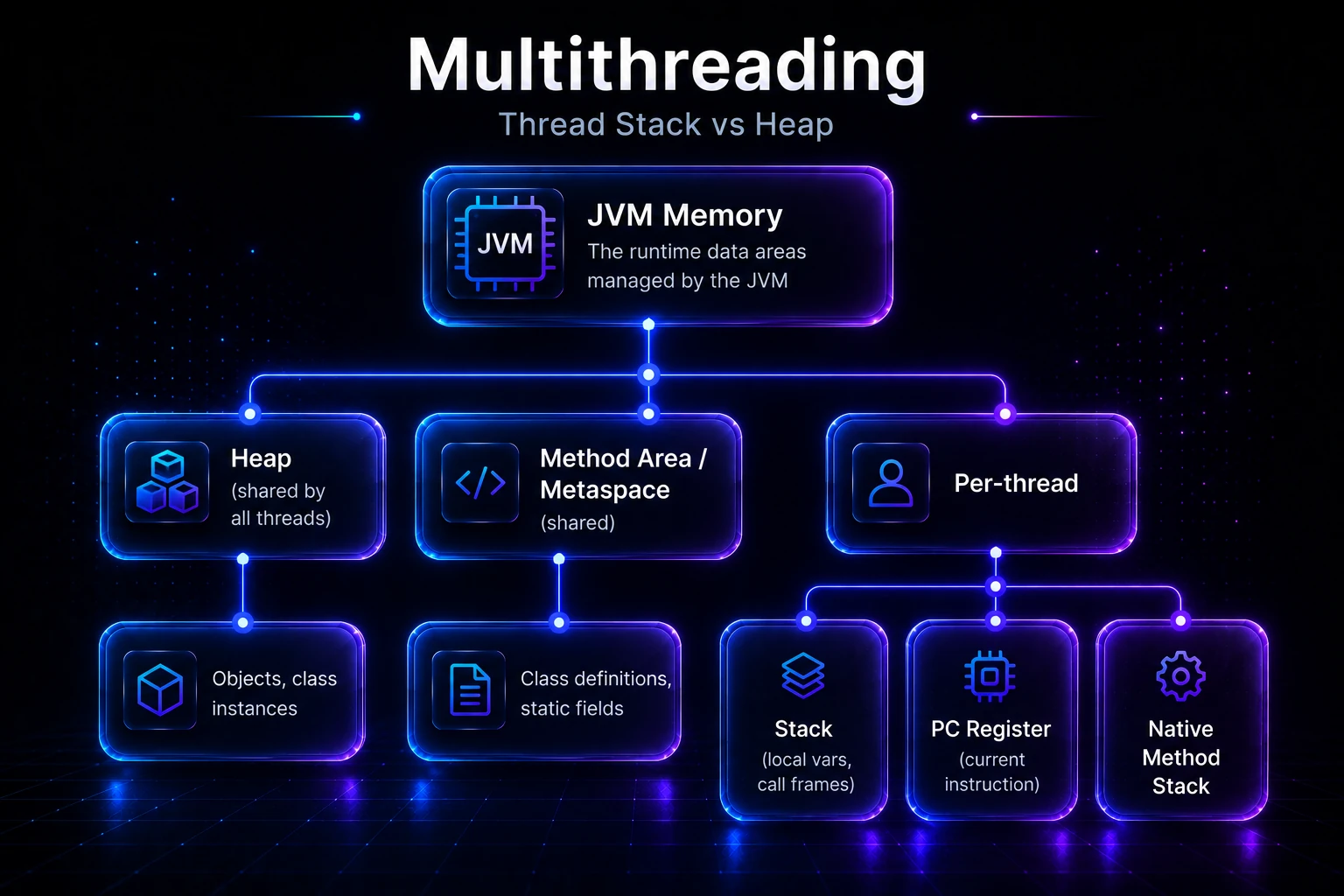
Thread Stack vs Heap
Each thread gets its own stack for local variables and method call frames. All threads share the heap — this is where objects live, which is why shared mutable objects require synchronization.
JVM Memory
├── Heap (shared by all threads)
│   └── Objects, class instances
├── Method Area / Metaspace (shared)
│   └── Class definitions, static fields
└── Per-thread
    ├── Stack (local vars, call frames)
    ├── PC Register (current instruction)
    └── Native Method Stack
The Java Memory Model (JMM) defines the rules for when one thread’s writes become visible to others — understanding it is essential for writing correct concurrent code.
The happens-before Guarantee
The JMM defines a happens-before relationship. If action A happens-before action B, then A’s effects are guaranteed visible to B. Key relationships:
- A
Thread.start()happens-before any action in the started thread - Any action in a thread happens-before
Thread.join()returns in another thread - A
synchronizedunlock happens-before the next lock on the same monitor - A write to a
volatilevariable happens-before any subsequent read of the same variable
In This Section
- Thread Life Cycle — Understand every state a thread can be in (NEW, RUNNABLE, BLOCKED, WAITING, TERMINATED) and how transitions happen.
- Creating a Thread — Three ways to create threads: extending
Thread, implementingRunnable, and usingCallable. - Thread Scheduler — How the JVM and OS decide which thread runs next, and what that means for your code.
- Thread.sleep() — Pause a thread for a set duration and understand why sleep does not release locks.
- Starting a Thread Twice — Why calling
start()on an already-started thread throwsIllegalThreadStateException. - run() vs start() — The critical difference:
start()creates a new thread;run()executes on the current thread. - Joining Threads — Use
join()to wait for a thread to finish before continuing execution. - Naming Threads — Give threads meaningful names for easier debugging and logging.
- Thread Priority — Hint to the scheduler which threads should run first (and why you should not rely on it).
- Daemon Threads — Background service threads that are automatically killed when all user threads finish.
- Thread Pools & Executors — Reuse threads efficiently using
ExecutorService,ThreadPoolExecutor, andExecutorsfactory methods. - ThreadGroup — Organize related threads into groups for bulk operations and monitoring.
- Shutdown Hook — Register code that runs automatically when the JVM is shutting down.
- Callable & Future — Submit tasks that return results and handle exceptions cleanly, unlike plain
Runnable.
Quick Reference: Key Classes & Interfaces
| Class / Interface | Package | Purpose |
|---|---|---|
Thread | java.lang | Represents a thread; extend to create custom threads |
Runnable | java.lang | Functional interface for thread tasks |
Callable<V> | java.util.concurrent | Like Runnable but returns a value and can throw checked exceptions |
Future<V> | java.util.concurrent | Holds the result of an async computation |
ExecutorService | java.util.concurrent | Manages a pool of threads |
synchronized | keyword | Ensures mutual exclusion on a method or block |
volatile | keyword | Guarantees visibility of a variable across threads |
ReentrantLock | java.util.concurrent.locks | Flexible explicit locking with try-lock support |
Related Topics
- Synchronization — Learn how to protect shared data from race conditions using
synchronizedmethods and blocks. - Deadlock — Understand how threads can get stuck waiting for each other and how to prevent it.
- Java Memory Model — The formal rules governing how threads see each other’s writes, including
volatileand happens-before. - Thread Pools & Executors — The modern, preferred way to manage threads in production applications.
- Virtual Threads (Project Loom) — Java 21’s lightweight threads that make high-concurrency simpler than ever.
- Callable & Future — Return values and handle exceptions from concurrent tasks cleanly.